Research library / Installation & diagnostics
Chatbot notifications and human handoff: verify that enquiries actually arrive
Choose notification channels by the recipient's ability to acknowledge and handle the enquiry, not the number of channels advertised. Track delivery and acknowledgement separately, with a fallback when a channel fails.
Editorial review: 2026-11-27 · MDN: Notifications API and browser limitations · PIP research, not a live vendor performance test.
Decision path
Work through the problem
Practical example
A common situation
A fictional service desk receives 12 urgent test enquiries: 12 are accepted by the queue, 11 reach the intended destination and eight are acknowledged within the team's chosen 15-minute window. Delivery is 11/12; timely acknowledgement is 8/12. The remaining four need investigation, not another batch of alerts.
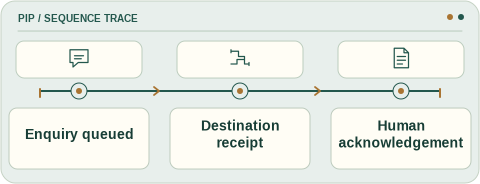
Illustrative decision workflow, not measured product performance.
Implementation guide
Where to go and what to check
Start here: Conversation event → dispatch queue → approved destination → human acknowledgement.
- Define distinct states for created, accepted by provider, received in the destination and acknowledged by an operator. Record timestamps and unique test IDs; do not put message bodies into broad logs.
- Choose a destination per enquiry category and operating hours. Test unavailable recipients, provider failure, timeout and retry without creating duplicate lead records.
- Where browser notifications are used, test supported devices, permissions and page/background behaviour. Keep an alternative such as an approved inbox or queue; do not depend on universal browser support.
- Exercise an authorised fictional escalation with the receiving team. Document where the event was visible and who confirmed it before advertising the channel as reliable.
What a passing test looks like
Each test enquiry is routed exactly once
Blocked or failed delivery has a visible fallback
An acknowledgement can be matched to the original event
Interactive troubleshooting
What are you seeing?
Recommended next check
Inspect destination-level receipt, spam or channel routing and avoid claiming human acknowledgement.
See all diagnostic paths
- API reports success but no message appears
- Inspect destination-level receipt, spam or channel routing and avoid claiming human acknowledgement.
- The team gets repeated alerts
- Check idempotency, retry logic and whether multiple integrations process the same event.
- Browser notifications are blocked
- Respect permission choices; use an agreed team-owned fallback rather than repeatedly prompting.
This is a diagnostic guide, not a test of your website. Verify actual configuration before changing it.
Verification checklist
Before you call this complete
Checklist state is local to this page and is not submitted or stored.
Practical questions
Frequently asked questions
Can I rely only on push notifications?
Not without testing the audience's actual browser and permission states. Keep an owned fallback.
How quickly should a human respond?
Choose a target based on urgency and staffed hours; measure actual acknowledgement rather than promising an unstaffed SLA.
What should retries include?
A stable event identifier, bounded attempts and a destination-level receipt where available.
Evidence and limitations
Primary sources
- MDN: Notifications API and browser limitations — checked 2026-11-27
- Intercom Messenger JavaScript methods — checked 2026-11-27
Vendor documentation and browser guidance informed the steps. Scenarios are illustrative; we have not accessed your installation. Preserve your site’s security and consent requirements.