Research library / Installation & diagnostics
Multilingual website chatbots: test language switching and local commercial accuracy
Evaluate multilingual chat using the actual languages your customers speak, including language switches in the same conversation. An answer in the right language still fails if it uses the wrong currency, policy or contact route.
Editorial review: 2026-11-27 · W3C: declaring language in HTML · PIP research, not a live vendor performance test.
Decision path
Work through the problem
Practical example
A common situation
A fictional events company serves UK and Italian customers. Its UK brochure lists £1,200 and the Italian offer is €1,500 with a different service area. The test asks the same availability question in both languages and then changes from English to Italian. Passing means the answer uses the correct selected market or asks which one the visitor means.
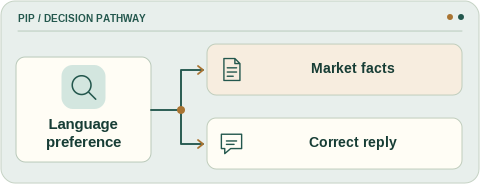
Illustrative decision workflow, not measured product performance.
Implementation guide
Where to go and what to check
Start here: Localised page → locale preference → market-specific sources → customer response.
- Choose two priority languages and produce fictional questions covering sales, support, ambiguity and follow-up. Store correct market facts and expected intent with each case.
- Verify page-level and embedded language markup where relevant, including readable labels and directionality for the languages you support. Let the visitor override language preference.
- Run the same question in each language, then switch languages mid-conversation. Check that prices, service areas, times and human contact routes remain tied to the correct market, not merely the last language detected.
- Ask a competent speaker to review critical commercial wording where possible; distinguish that qualitative review from automated language detection.
What a passing test looks like
Correct meaning and market facts in each test language
An explicit language change is respected without losing allowed context
No invented translation of a missing policy
Interactive troubleshooting
What are you seeing?
Recommended next check
Inspect market selection and source precedence; ask for location when needed.
See all diagnostic paths
- Correct language, wrong currency
- Inspect market selection and source precedence; ask for location when needed.
- The chatbot switches language unexpectedly
- Preserve the user's explicit language choice and test multi-turn context.
- The bot cannot support the requested language
- Say so clearly, offer a supported alternative or a human reply route.
This is a diagnostic guide, not a test of your website. Verify actual configuration before changing it.
Verification checklist
Before you call this complete
Checklist state is local to this page and is not submitted or stored.
Practical questions
Frequently asked questions
Is a multilingual chatbot enough to localise a website?
No. The website, service terms, support routes and accessibility also matter.
Can one chatbot serve different countries?
Yes in principle, if source scope and market choice are explicit and routing is tested. Language alone is not a reliable market identifier.
Should the bot translate an unverified price?
No. Use approved local prices or explain the missing information.
Evidence and limitations
Primary sources
- W3C: declaring language in HTML — checked 2026-11-27
- OWASP: sensitive information disclosure — checked 2026-11-27
Vendor documentation and browser guidance informed the steps. Scenarios are illustrative; we have not accessed your installation. Preserve your site’s security and consent requirements.