Intelligence lab / Migration
Intercom export planner
Choose an export according to the fields you need. Individual or bulk transcripts differ from reporting CSVs, saved Inbox Views and cloud JSON. Verify a sample before migrating.
Fixture 2026-11-26-v1 · PIP research · no live vendor measurements.
Interactive · browser-only
Work with your own assumptions
Choose a worked example or enter your own non-identifying assumptions, then run the calculation.
Local only. Use non-identifying inputs, never customer data or credentials. Downloads stay on your device.
Illustrative example result · not measured vendor performance
Export path for your use case
Conversations API / permitted bulk content export
Scroll the result table sideways on smaller screens if needed.
| Decision | Action or limitation |
|---|---|
| Where to go | Use authorised Inbox bulk PDF/text exports for up to about 200–300 conversations per operation; for larger volumes, list IDs and retrieve details via Conversations API. |
| Expected scope | Conversation content, subject to chosen method and access. |
| Verify before migration | Reconcile count and sample chronology; rate/permission/retention limits apply. |
| Permission | Use only authorised export capabilities and permitted records; check current plan and retention. |
Interpretation and limitations
- Source checked 26 November 2026. No account accessed and no data exported by this tool. Verify vendor docs, retention and destination capability with a sanitised sample.
Take the result with you
Download the current scenario report as JSON. The report includes inputs and limitations, not a certification.
Why this matters
Practical situation
Before leaving a helpdesk, decide whether you need a single case archive, reporting metadata or bulk conversation content. A downloaded CSV can omit the transcript.
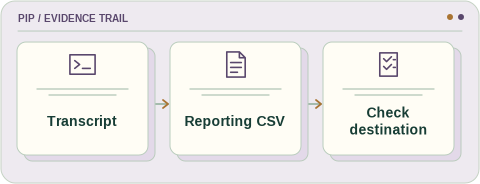
Research workflow; use the tool for actual inputs.
Reproducible method
Work through the test
Illustrative methodology; test real configurations only with authorisation.
Make this useful in practice
What to do next
Verify an authorised, sanitised sample and destination capability. Intercom's cloud-export wording is inconsistent about transcripts; don't assume completeness.
Products discussed
Marks identify the products discussed; no affiliation or endorsement is implied. Official asset sources are linked where a logo is shown.
Evidence and boundaries
Sources and scope
- Intercom conversation export documentation · 2026-11-26
- Intercom cloud storage export documentation · 2026-11-26
Examples and outcomes here are computed from explicit assumptions or user-supplied observations. Do not treat them as a certification, competitor measurement, real booking or guaranteed commercial result. No confidential records or third-party access are required.