Research library / Installation & diagnostics
Create a Crisp direct chat link without embedding the widget
Use the public Website ID in a direct Crisp chatbox URL. It opens that workspace's chat without requiring a widget script on the page where you place the link.
Editorial review: 2026-11-26 · Crisp direct chatbox link documentation · PIP research, not a live vendor performance test.
Decision path
Work through the problem
Practical example
A common situation
An agency has a campaign landing page without a widget. A support link can open its existing chatbox instead. Before sharing, check a fictional enquiry arrives in the agency inbox rather than a client's workspace. No new widget subscription is implied.
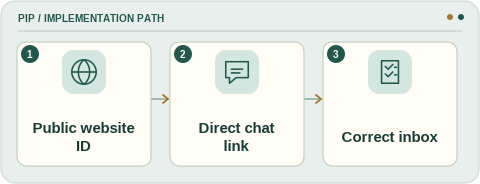
Implementation concept; follow documented steps and verification checks.
Implementation guide
Where to go and what to check
Start here: Crisp → Settings → Workspace Settings → Setup & Integrations → Website ID.
- Use the public ID in https://go.crisp.chat/chat/embed/?website_id=MY_WEBSITE_ID, replacing the placeholder. Do not include real visitor information or session credentials.
- Open the resulting URL in a private window and submit a labelled fictional enquiry to your authorised workspace.
- Confirm the destination inbox and intended routing, then add a clearly labelled support button and keep a fallback contact route.
What a passing test looks like
Correct workspace chatbox opens in a fresh browser
Fictional message reaches that inbox only
Plain URL works on mobile without visitor data
Interactive troubleshooting
What are you seeing?
Recommended next check
Compare the URL's Website ID with the intended workspace and replace the link.
See all diagnostic paths
- Wrong inbox
- Compare the URL's Website ID with the intended workspace and replace the link.
- Link opens but no reply
- Confirm the message reached the inbox, then check routing and availability.
- Visitor details appear in the URL
- Remove unnecessary personal and session parameters; investigate any exposure.
This is a diagnostic guide, not a test of your website. Verify actual configuration before changing it.
Verification checklist
Before you call this complete
Checklist state is local to this page and is not submitted or stored.
Practical questions
Frequently asked questions
Does this create another inbox?
No. The Website ID selects the existing workspace.
Does it add a launcher to the landing page?
No. The visitor opens a separate chatbox when clicking; use a normal embed for an in-page launcher.
Products discussed
Marks identify the products discussed; no affiliation or endorsement is implied. Official asset sources are linked where a logo is shown.
Evidence and limitations
Primary sources
- Crisp direct chatbox link documentation — checked 2026-11-26
Vendor documentation and browser guidance informed the steps. Scenarios are illustrative; we have not accessed your installation. Preserve your site’s security and consent requirements.