Research library / Installation & diagnostics
Fix Crisp Invalid Website or invalid chatbox code errors
Check the Website ID, workspace state and domain lock together. Crisp documents these as common causes of invalid-website errors, especially on a staging or preview hostname.
Editorial review: 2026-11-26 · Crisp invalid website troubleshooting · PIP research, not a live vendor performance test.
Decision path
Work through the problem
Practical example
A common situation
A developer copies a production widget to a new staging host and receives Invalid Website. A correct ID can still be rejected because domain restrictions are doing their job. Prefer an approved test configuration to permanently removing a production restriction.
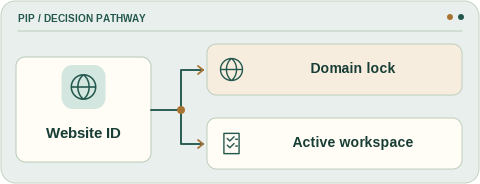
Implementation concept; follow documented steps and verification checks.
Implementation guide
Where to go and what to check
Start here: Crisp workspace → Settings → Chatbox Settings → Chatbox Security; compare Setup & Integrations → HTML.
- Record the failing hostname and compare CRISP_WEBSITE_ID against the intended active workspace; redact tenant-specific values in shared logs.
- Check whether the domain lock intentionally excludes preview or localhost. Prefer a scoped, authorised staging setup; preserve production restrictions.
- If the workspace was deleted or the WordPress plugin points elsewhere, relink the authorised active workspace. Test the real site.
What a passing test looks like
Website ID belongs to intended active workspace
Hostname satisfies approved domain restrictions
Correct chatbox visible without weakening production
Interactive troubleshooting
What are you seeing?
Recommended next check
Inspect domain lock and approved staging hostname.
See all diagnostic paths
- Only staging fails
- Inspect domain lock and approved staging hostname.
- All domains fail
- Compare installed ID with active workspace.
- Workspace deleted
- Install the code from the authorised active replacement workspace.
This is a diagnostic guide, not a test of your website. Verify actual configuration before changing it.
Verification checklist
Before you call this complete
Checklist state is local to this page and is not submitted or stored.
Practical questions
Frequently asked questions
Why does production work but preview fail?
The domain lock can reject hosts outside the configured domain and subdomains.
What if the workspace was deleted?
The old Website ID is invalid; get the current code for an authorised active workspace.
Products discussed
Marks identify the products discussed; no affiliation or endorsement is implied. Official asset sources are linked where a logo is shown.
Evidence and limitations
Primary sources
- Crisp invalid website troubleshooting — checked 2026-11-26
Vendor documentation and browser guidance informed the steps. Scenarios are illustrative; we have not accessed your installation. Preserve your site’s security and consent requirements.