Research library / Installation & diagnostics
Multi-site chatbots for agencies: separate client knowledge, settings and enquiries
Before managing chatbots across client websites, verify separation of client knowledge, conversations, branding, permissions and enquiry destinations. A shared dashboard must not become shared access to unrelated customer data.
Editorial review: 2026-11-27 · OWASP: sensitive information disclosure · PIP research, not a live vendor performance test.
Decision path
Work through the problem
Practical example
A common situation
A fictional agency manages a property website and a catering website. Both ask about a 'deposit', but their terms differ. A visitor on the property site must never receive the catering site's answer or have an enquiry delivered to the catering team's inbox. Removing a widget from one site must not disable the other.
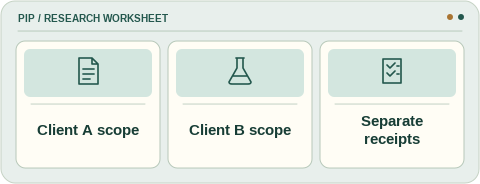
Illustrative decision workflow, not measured product performance.
Implementation guide
Where to go and what to check
Start here: Domain inventory → tenant mapping → scoped data and routes → staged release.
- Prepare two fictional tenants with deliberately conflicting business facts, separate owners and inboxes. Define which admin permissions apply to each; do not rely on a client-supplied domain string as the sole authorisation check.
- Test requests against both tenants, including a deliberate wrong-tenant reference using synthetic IDs. Inspect authorisation and retrieval scope, output and logs without exposing customer data.
- Record the approved embed version and configuration per host. Verify one install, mobile layout, permission state and actual synthetic delivery separately for each site.
- Enable a small authorised batch, recheck previously active sites, and preserve a per-site rollback. Reconcile active domains with the canonical inventory rather than assuming all configured sites are live.
What a passing test looks like
No cross-tenant facts, conversation history or private metadata are returned
Every fictional enquiry reaches the correct client inbox
One site can be disabled or restored without changing another
Interactive troubleshooting
What are you seeing?
Recommended next check
Stop the affected rollout and investigate tenant scoping in retrieval and caching.
See all diagnostic paths
- A client sees another client's answer
- Stop the affected rollout and investigate tenant scoping in retrieval and caching.
- Both sites send to one inbox
- Check domain-to-tenant configuration and verify individual downstream receipts.
- Removing one widget affects another
- Separate installation and disable controls; retest both hosts before proceeding.
This is a diagnostic guide, not a test of your website. Verify actual configuration before changing it.
Verification checklist
Before you call this complete
Checklist state is local to this page and is not submitted or stored.
Practical questions
Frequently asked questions
Can an agency share one chatbot subscription?
Plan terms vary. Check bot limits, client permissions and isolation, not only the number of included widgets.
Is a different website ID sufficient for tenant isolation?
No. Verify server-side authorisation, retrieval and storage boundaries.
How many sites should I launch at once?
Start with a small batch that you can independently verify and reverse. Increase only after clean results.
Evidence and limitations
Primary sources
- OWASP: sensitive information disclosure — checked 2026-11-27
- OWASP: prompt injection — checked 2026-11-27
Vendor documentation and browser guidance informed the steps. Scenarios are illustrative; we have not accessed your installation. Preserve your site’s security and consent requirements.
Founder case study · Original evidence
From one chatbot subscription to a multi-site architecture
Read how our experience with a paid chatbot led us to build a shared assistant with separate site profiles and knowledge sources.
Read the multi-website chatbot case study →