Research library / Installation & diagnostics
Add a chatbot to Webflow: site-wide or page-specific code?
Use Webflow's site-level footer custom code for a widget needed on every page; choose page-level code only for deliberate page-specific coverage. Save and publish before checking live.
Editorial review: 2026-11-26 · Webflow custom code · PIP research, not a live vendor performance test.
Decision path
Work through the problem
Practical example
A common situation
A lead-generation site has chat on its homepage but not service pages. Page-level placement explains the pattern. If all pages need chat, move the authorised installation to site-wide footer code and remove the previous page-level copy.
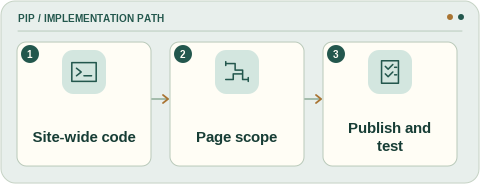
Implementation concept; follow documented steps and verification checks.
Implementation guide
Where to go and what to check
Start here: Webflow Site settings → Custom code → Footer code for global coverage; Page settings for intentional page-only scope.
- Decide which published URLs should contain chat and confirm that the role and subscription permit custom code.
- Paste the complete authorised snippet in the appropriate field, preserving unrelated code. For site-wide Tidio, use Footer code once; remove page-level duplicates.
- Save and publish to the intended target. Test the actual domain, an included URL and a deliberately excluded URL if applicable.
What a passing test looks like
Expected scope matches public source
One install per included URL
Published site tested, not only preview
Interactive troubleshooting
What are you seeing?
Recommended next check
Inspect page-level versus site-level placement; move the single installation if appropriate.
See all diagnostic paths
- Only homepage has chat
- Inspect page-level versus site-level placement; move the single installation if appropriate.
- Preview works, live doesn't
- Publish and verify the public URL.
- Custom code unavailable
- Check role and plan eligibility; do not bypass controls.
This is a diagnostic guide, not a test of your website. Verify actual configuration before changing it.
Verification checklist
Before you call this complete
Checklist state is local to this page and is not submitted or stored.
Practical questions
Frequently asked questions
Why does chat appear only on one page?
Check page-specific placement before changing the vendor account.
Does saving custom code make it live?
No. Publish the site to the intended target after saving.
Products discussed


Marks identify the products discussed; no affiliation or endorsement is implied. Official asset sources are linked where a logo is shown.
Evidence and limitations
Primary sources
- Webflow custom code — checked 2026-11-26
- Tidio Webflow example — checked 2026-11-26
Vendor documentation and browser guidance informed the steps. Scenarios are illustrative; we have not accessed your installation. Preserve your site’s security and consent requirements.