Research library / Installation & diagnostics
Secure Intercom Messenger for signed-in users with JWTs
Generate the Messenger JWT on the authenticated server using the vendor's recommended identity verification flow. Keep the signing secret out of browser code and verify refresh and identity alignment.
Editorial review: 2026-11-26 · Intercom secure Messenger · PIP research, not a live vendor performance test.
Decision path
Work through the problem
Practical example
A common situation
A SaaS portal sends a user ID from the browser to the Messenger. Browser data can be altered; a server-generated signed token is the documented security mechanism. Do not paste real tokens into online debugging sites or public fixtures.
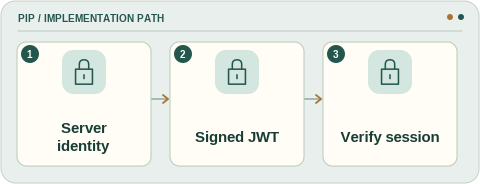
Implementation concept; follow documented steps and verification checks.
Implementation guide
Where to go and what to check
Start here: Intercom Messenger security settings; authenticated server session service, not browser-side signing.
- Use the authenticated application's stable user_id in the token payload; generate the JWT on your server with the correct workspace Messenger secret.
- Follow the documented boot/update and refresh flow. Match expiry to the app session and review all logged-in channels, including mobile if present.
- In an isolated test workspace verify valid, expired, missing and mismatched synthetic identity under enforcement. If a secret ships to the browser, isolate and rotate via authorised settings.
What a passing test looks like
Valid synthetic identity sees only its own history
Missing/expired/wrong identity handled without cross-user exposure
Signing secret absent from frontend assets; relevant channels secured
Interactive troubleshooting
What are you seeing?
Recommended next check
Check server identity mapping, expiry and workspace configuration.
See all diagnostic paths
- Valid user rejected
- Check server identity mapping, expiry and workspace configuration.
- Token expires
- Review refresh on boot/update and app timing.
- Secret in frontend
- Treat as exposure: isolate, rotate via authorised settings and repair build.
This is a diagnostic guide, not a test of your website. Verify actual configuration before changing it.
Verification checklist
Before you call this complete
Checklist state is local to this page and is not submitted or stored.
Practical questions
Frequently asked questions
Is a browser-supplied user ID sufficient?
No. Use your trusted server session and the documented signature mechanism.
Can I secure only the web widget?
Other insecure logged-in integrations can leave the workspace exposed. Review every relevant channel.
Products discussed
Marks identify the products discussed; no affiliation or endorsement is implied. Official asset sources are linked where a logo is shown.
Evidence and limitations
Primary sources
- Intercom secure Messenger — checked 2026-11-26
- Intercom JWT authentication — checked 2026-11-26
Vendor documentation and browser guidance informed the steps. Scenarios are illustrative; we have not accessed your installation. Preserve your site’s security and consent requirements.