Research library / Installation & diagnostics
Intercom prefilled messages: showNewMessage versus startConversation
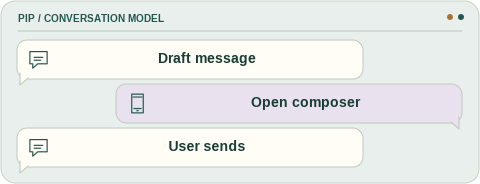
Use Intercom('showNewMessage', 'your draft') to open an editable message composer. The separate startConversation method sends its message immediately, so do not substitute it for a button that promises only to prepare a draft.
Editorial review: 2026-11-26 · Intercom Messenger methods: showNewMessage, startConversation, ready and onConversationStart · PIP research, not a live vendor performance test.
Decision path
Work through the problem
Practical example
A common situation
A fictional software reports page offers 'Give feedback on reports'. On activation it opens a draft reading 'Feedback about the reports page:'. The visitor can add detail, cancel or explicitly send. For ten fictional button activations with four completed sends, the expected submission count is four, not ten; the example illustrates event accounting, not measured conversion.
Implementation concept; follow documented steps and verification checks.
Implementation guide
Where to go and what to check
Start here: Your application feedback-button handler → Intercom JavaScript methods → showNewMessage.
- Decide the exact plain-language button promise, such as 'Prepare feedback'. Use a generic editable prompt, not an account identifier, secret or sensitive information.
- After permitted Messenger initialisation, call Intercom('showNewMessage', 'Feedback about the reports page:'). Provide a contact alternative if the session cannot become ready; the documented ready callback does not signal failure.
- With fictional users in an authorised workspace, test opening, editing, cancelling and sending. Compare recorded draft actions with the actual conversation receipt; the browser conversation-start event only covers its documented page and registration scope.
What a passing test looks like
Editable draft, with no immediate-send call
Cancel and explicit submit produce different observable outcomes in test
Event reporting distinguishes attempts and confirmed submissions
Interactive troubleshooting
What are you seeing?
Recommended next check
Inspect the handler for startConversation or another immediate-send path; remove it from draft-only actions.
See all diagnostic paths
- A conversation appears before the visitor sends
- Inspect the handler for startConversation or another immediate-send path; remove it from draft-only actions.
- The draft never opens
- Check the permitted Messenger boot and ready state, then offer another contact route if readiness fails.
- Analytics counts every button click as an enquiry
- Record draft opening separately from confirmed conversation creation; use a documented conversation-start event with its scope limitations.
This is a diagnostic guide, not a test of your website. Verify actual configuration before changing it.
Verification checklist
Before you call this complete
Checklist state is local to this page and is not submitted or stored.
Practical questions
Frequently asked questions
Does showNewMessage send the prefilled message?
It prepares the composer; startConversation is the documented immediate-send method.
Can ready tell me the Messenger failed?
No. It fires on successful boot, so handle unavailable sessions and timeouts separately.
Products discussed
Marks identify the products discussed; no affiliation or endorsement is implied. Official asset sources are linked where a logo is shown.
Evidence and limitations
Primary sources
- Intercom Messenger methods: showNewMessage, startConversation, ready and onConversationStart — checked 2026-11-26
Vendor documentation and browser guidance informed the steps. Scenarios are illustrative; we have not accessed your installation. Preserve your site’s security and consent requirements.