Research library / Installation & diagnostics
Install Tidio with Google Tag Manager without loading it twice
Use one GTM Custom HTML tag and the documented Initialization – All Pages trigger, scoped to your approved consent and loading policy. Remove duplicate installations, preview and publish.
Editorial review: 2026-11-26 · Tidio GTM installation · PIP research, not a live vendor performance test.
Decision path
Work through the problem
Practical example
A common situation
An SPA has both a plugin and a GTM tag, and a history trigger on the tag. Choose one installation owner and retest full loads and client navigation. A second request is not a reason to purchase another chatbot subscription.
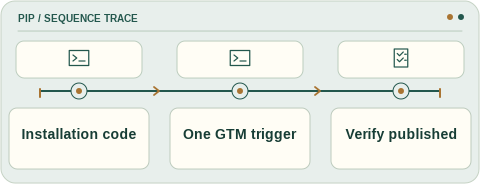
Implementation concept; follow documented steps and verification checks.
Implementation guide
Where to go and what to check
Start here: Tidio → Settings → Live Chat → Installation → Manual install; GTM → Tags → New → Custom HTML.
- Copy the public project snippet into one named Custom HTML tag. Inventory existing theme, plugin and GTM installations before enabling it.
- Use the documented Initialization – All Pages trigger only where permitted by the site's consent/loading policy. Preview a full reload and an internal SPA route change; do not add History Change to the installation tag.
- Publish a named container version. Check the public site in a regular browser, the Tidio installation indicator and a synthetic chat.
What a passing test looks like
One intended tag firing on full reload
Zero additional installation firings on SPA navigation
Visible chat where permitted; synthetic message succeeds
Interactive troubleshooting
What are you seeing?
Recommended next check
Check container placement, triggers and consent conditions in preview.
See all diagnostic paths
- Tag never fires
- Check container placement, triggers and consent conditions in preview.
- Fires again on navigation
- Remove the history trigger from the installation tag and inspect other install sources.
- Works only in preview
- Publish the saved container version, then test the actual site.
This is a diagnostic guide, not a test of your website. Verify actual configuration before changing it.
Verification checklist
Before you call this complete
Checklist state is local to this page and is not submitted or stored.
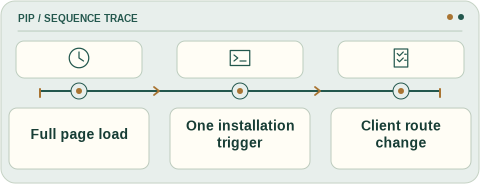
Check full loads and route changes separately.
Practical questions
Frequently asked questions
Should I add a History Change trigger?
Not to the installation tag: the documented setup loads once per document. Track route changes separately if needed.
Can I exclude checkout?
Scope the installation under your approved policy; hiding an already loaded widget is not equivalent to preventing requests.
Products discussed
 Google Tag Manager
Marks identify the products discussed; no affiliation or endorsement is implied. Official asset sources are linked where a logo is shown.
Evidence and limitations
Primary sources
- Tidio GTM installation — checked 2026-11-26
Vendor documentation and browser guidance informed the steps. Scenarios are illustrative; we have not accessed your installation. Preserve your site’s security and consent requirements.