Research library / Installation & diagnostics
Install Tidio on WordPress: plugin or manual script?
For most WordPress sites use the official plugin, activate it and connect the intended project. If manual JavaScript is necessary, use that method instead of the plugin.
Editorial review: 2026-11-26 · Tidio WordPress installation · PIP research, not a live vendor performance test.
Decision path
Work through the problem
Practical example
A common situation
An Elementor site shows the plugin as active but no chat bubble appears. Compare a fresh browser load with cached public HTML. If the plugin already owns installation, adding another Elementor snippet creates a duplicate rather than resolving caching.
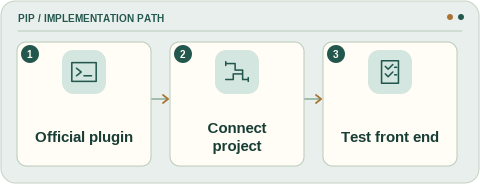
Implementation concept; follow documented steps and verification checks.
Implementation guide
Where to go and what to check
Start here: WordPress admin → Plugins → Add New; install the official Tidio plugin and connect the intended project.
- Record whether the plugin, builder or theme currently owns installation; inspect the public source for the expected vendor host.
- Activate and connect the official plugin. Do not add a separate manual script through Elementor or Divi at the same time.
- Purge relevant cached pages if necessary; check a fresh public browser session and send a synthetic message. Restore any temporarily paused cache settings.
What a passing test looks like
One authorised installation path
Correct project and public snippet
Chat works after caching is restored
Interactive troubleshooting
What are you seeing?
Recommended next check
Verify project connection and published HTML; investigate cache in a controlled test.
See all diagnostic paths
- Plugin active, no bubble
- Verify project connection and published HTML; investigate cache in a controlled test.
- Two script requests
- Search builder, theme and tag manager for a second copy.
- Plugin login fails
- Follow vendor account recovery or use an authorised manual alternative after removing the plugin installation.
This is a diagnostic guide, not a test of your website. Verify actual configuration before changing it.
Verification checklist
Before you call this complete
Checklist state is local to this page and is not submitted or stored.
Practical questions
Frequently asked questions
Does Elementor need another script?
The vendor recommends the plugin even with Elementor or Divi. A manual method is an alternative, not an addition.
Why is the bubble absent after activation?
Check project connection, source, consent, visibility and cache before reinstalling.
Products discussed


Marks identify the products discussed; no affiliation or endorsement is implied. Official asset sources are linked where a logo is shown.
Evidence and limitations
Primary sources
- Tidio WordPress installation — checked 2026-11-26
Vendor documentation and browser guidance informed the steps. Scenarios are illustrative; we have not accessed your installation. Preserve your site’s security and consent requirements.